
Opt-In Web Forms
for SMS Marketing.
Turn Interest into Permission — Instantly
Web forms are the simplest way to turn "interest" into "permission." No hunting for a keyword. No switching apps. No second-guessing what to text. They type, tap submit, and they're in. That one smooth step is the difference between "I'll do it later" and "done."
Auto-triggered: Welcome text fires instantly after submission — subscriber added to your list in real time
Web Forms Are Your
Highest-Converting Lead Tool.
of Businesses Use Web Forms for Lead Generation
Nearly 50% call them their single most effective conversion tool — outperforming paid ads, social media, and email campaigns for direct opt-in capture.
FormStory / Form-QR-Code-Generator 2025Higher Conversions with Multi-Step Forms
Multi-step forms that break data collection into stages convert 86% higher than single-page forms — while collecting just as much information. Only 40% of marketers currently use them.
HubSpot Form AnalyticsConversion Boost — Removing One Field
Reducing a form from 4 fields to 3 can increase conversion by nearly 50%. Every additional field costs an average 4.1% in conversions. Less is more.
HubSpot / Quicksprout ResearchMore Likely to Share Info After Initial Form Fill
Users who provide just a name and number first are 320% more likely to share additional details in later interactions. Start with the essentials — build the profile over time.
Stanford University 2024 Meta-Analysisof Consumers Chose a High-Value Prize as Top Lead Incentive
Contest and sweepstakes entry is the #1 most attractive lead magnet incentive among consumers — beating discounts, content access, and newsletter sign-ups. Forms are how you capture that entry cleanly.
Lead Magnet Statistics 2025Average Email Collection Form Conversion Rate
Email collection forms convert at 15% on average — making them one of the most reliable opt-in mechanisms available, especially when paired with an SMS welcome sequence.
HubSpot / WPForms ResearchMore Conversions When You Respond in the First Minute
Responding to form submissions within the first minute increases conversions by 391%. An automated welcome text triggered by form submission is how you hit that window every single time.
Chili Piper Benchmark Report 2025Average Form Abandonment Rate with 7+ Fields
When a form requests more than 7 fields, abandonment jumps to 67.8%. The sweet spot for lead generation is 3–5 fields. Our Form Wizard makes it easy to collect only what you actually need.
Formstack Study 2025 / Forrester Research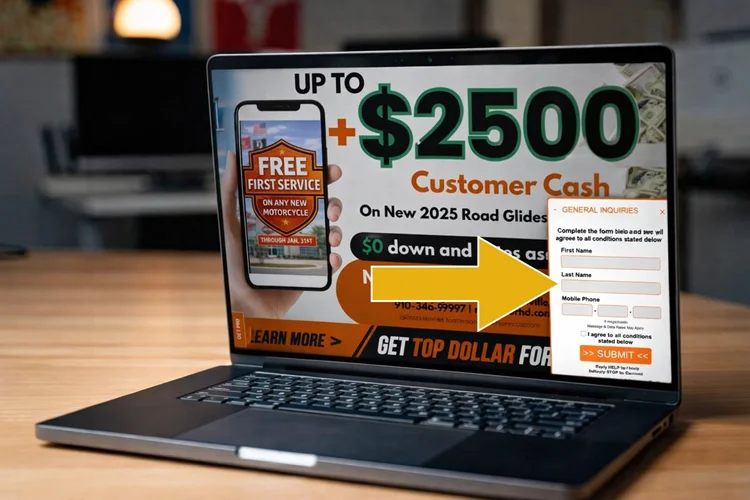
A Good Form Removes
Friction and Builds Trust.
When someone is already on your website, reading an email, or scrolling your Facebook page, a form gives them a fast, familiar action to take. It works everywhere your audience already hangs out.
- Fewer steps equals more sign-ups. People understand forms. They don't have to remember a keyword or open their messaging app — the path from interest to opt-in is frictionless.
- Clear permission at the point of capture. Opt-ins happen where the customer already is, with language and consent disclosures you control. Every submission is documented.
- Works everywhere your audience hangs out. Website pages, landing pages, Facebook Pages, and email campaigns can all become opt-in entry points with a single embed.
- Instant gratification drives completions. After they submit, an automatic welcome text confirms the relationship immediately — reducing second-guessing and boosting subscriber quality.
- Collect exactly what you need — nothing more. Choose which fields to include. Name, number, email, birthday, ZIP, interests. Only ask what will make your marketing smarter.
Build It Once.
Deploy It Everywhere.
7 Media Group's HTML-based web forms connect your mobile marketing campaigns to the places you already drive traffic. The Form Wizard puts every decision in your hands — no developer required.
Choose Your Data Fields
Select exactly what you want to collect. Research says 3–5 fields is the conversion sweet spot — start there and add over time as you learn what matters to your audience.
Assign the Opt-In Keyword
Behind the scenes, every form submission is tied to the correct opt-in keyword in your platform. Subscribers are automatically added to the right list — no manual sorting, no missing contacts.
Customize the Design
Match the form to your brand — colors, fonts, labels, button text. A branded form on a branded page converts better than a generic widget that looks like an afterthought.
Deploy — Anywhere
Embed on any webpage. Add to a Facebook Page. Drop into an email newsletter. Link from an SMS campaign. One form, many entry points — all feeding the same list automatically.
Auto-Send a Welcome Text
The moment someone submits, an optional automated text fires immediately — welcome message, confirmation, special offer, or next step. 391% more conversions happen when you respond in the first minute.
Track & Own Your Data
Every submission builds your contact list in real time. Name, number, email, custom fields — all stored in your platform. Your data. Your list. Ready for your next campaign the moment it lands.
of Businesses Say Web Forms Are Their Most Effective Conversion Tool
Not ads. Not social media. Not email blasts. Web forms. Nearly half of all businesses identify them as the single tool that converts best. And when those forms are tied to an immediate SMS welcome sequence — triggered the moment someone submits — the combination creates one of the most reliable opt-in pipelines available. You grow the list, you own the data, and you send the first message before they've closed the tab.
Every Touchpoint
Is an Entry Point.
The same form technology powers three completely different customer interactions — website conversations, in-store kiosk check-ins, and SMS-driven data collection campaigns.
Website & Chat-to-Text
Embed a form on your website so visitors can start a conversation directly — and take it with them to their phone via SMS. Works as a Chat-to-Text trigger, a VIP sign-up, a contact form, or a lead capture widget on any landing page.
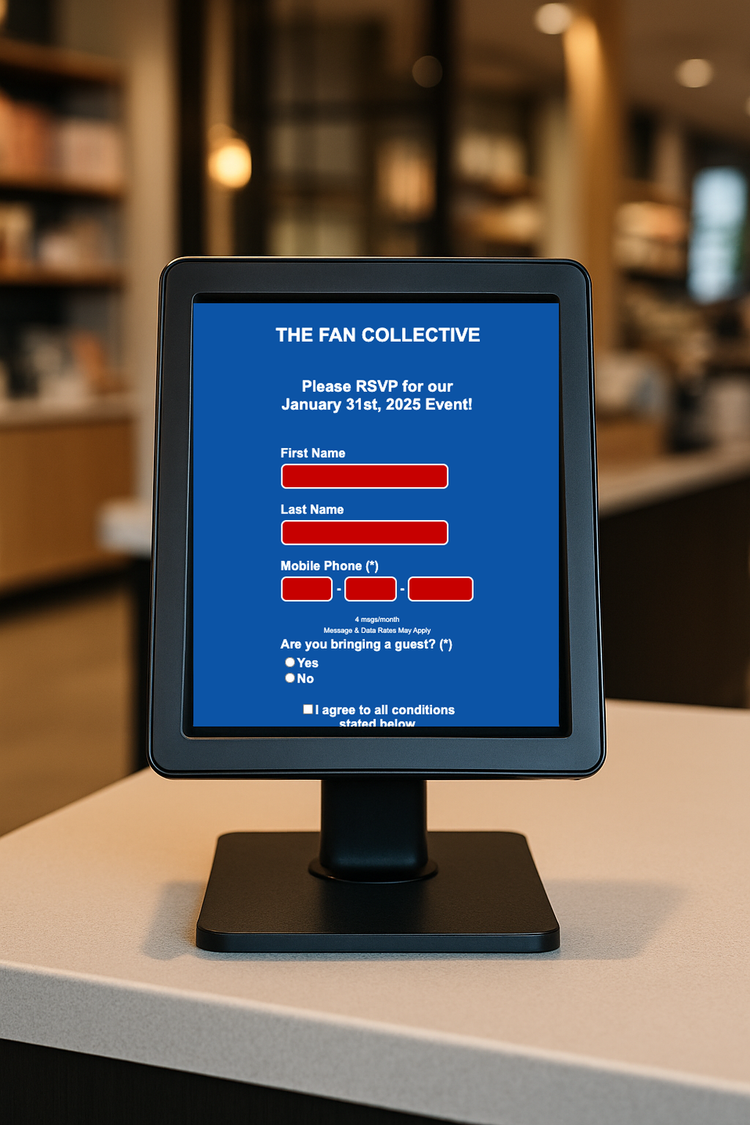
Digital Kiosk Check-In & RSVP
A web form on a digital kiosk lets customers check in, RSVP for an event, enter a contest, or join your mobile club right at the counter. List-building happens while they're already engaged and on-site — your highest-intent audience.
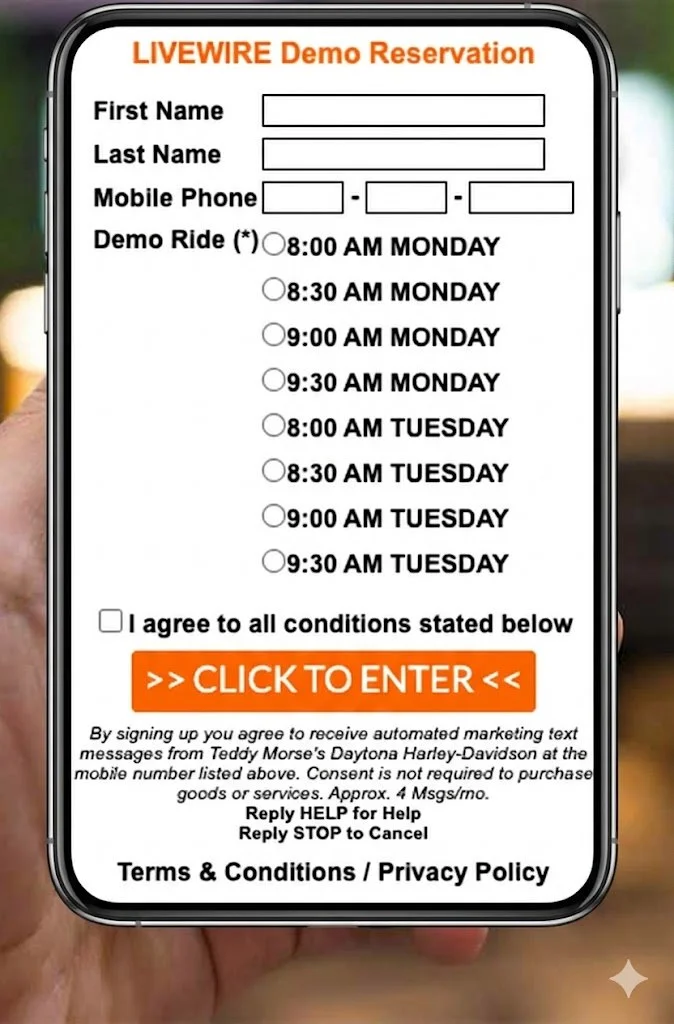
SMS-Driven Data Collection
Send a text alert to your existing list with a short URL directing to a mobile-friendly web form. Collect preferences, contest entries, event RSVPs, service requests, or customer profile updates — all from a single text campaign.
The Simplest Form
Is the Best Form.
Fields is the optimal starting point. First name, mobile number, and a consent checkbox. That's all you need to start the relationship — ask for more over time.
The average number of form fields across all forms. Adding birthday, email, or ZIP is a reasonable step two — but never the first ask.
The first 10 seconds are decisive. 35% of visitors decide in this window whether to complete or abandon a form. A clear headline and minimal fields make those seconds count.
Progressive profiling can increase conversions by 20%. Collect a little at first, then gather additional data across future interactions as trust builds.
Field-by-Field Best Practices
-
Do this
Pick your highest-traffic spot first. Homepage banner, "Contact Us" page, or your next email newsletter. That's where your form will do the most work immediately.
-
Keep it short
Only ask for the essentials. First name + mobile number + consent checkbox. Trigger a simple welcome text immediately after. Prove the value before you ask for more.
-
Incentivize
Give them a reason to fill it out. A contest entry, a discount, early access, or a birthday reward. 64% of consumers say a high-value prize is the most attractive lead magnet incentive.
-
Mobile first
Single-column layouts complete 15 seconds faster on mobile. Large tap targets. Minimal required fields. No dropdowns if you can avoid them — they cause 15% more abandonment than checkboxes.
-
Auto-respond
Set up your welcome text before you launch the form. The first minute after someone submits is your highest-leverage moment. An automated response converts 391% better than silence.
Ready to Turn Every
Visitor into a Subscriber?
We'll show you exactly how to build, deploy, and automate your first web form — and the welcome text that fires the moment someone submits it.